My Final Thoughts on Social Media

Social media has revolutionized the way human beings get information, communicate and interact with one another.  

Here is a quick overview of some of social media’s pros and cons. 

Social media pros: Social media cons: 
– spreads information faster than any other media – enables the spread of unreliable and false information 
– law enforcement uses social media to catch and prosecute criminals – lacks privacy and exposes users to government and corporate intrusions 
– allows people to improve their relationships and make new friends – can lead to stress and offline relationship problems 
– helps empower business women – can entice people to waste time 
– helps employers find employees and job-seekers find work – its use can harm job stability and employment prospects 
– increases voter participation – criminals use social media to commit and promote crimes 
– facilitates political change – can endanger the military, journalists, and activists 
– allows for quick, easy dissemination of public health and safety information from reputable sources. – aids the spread of hate groups. 

Before this class I did not know how wikis worked. Now I know that a wiki is a collection of articles that multiple users can add to and edit freely online.  The best-known example of a wiki web site is Wikipedia which, per a 2008 study, has an accuracy rate of 80 percent — not bad for a free, crowd-sourced encyclopedia. 

All businesses (big and small) need to include social media into their business plan because it provides targeting capability, as well as reach and scale, at a lower cost than almost all other marketing channels.  

Social media marketing allows companies to directly engage with their customers, build brand presence, and ultimately sell more products. It also provides a way to combat blind spending by allowing a company to collect information on the potential customer’s interests, based on the reactions they have to the posts which indicates where the company should be spending the marketing money. 
Why is it important for businesses to engage in social media marketing?

Social media marketing can completely revolutionize a business. For the past decade or so, the importance of digital marketing for small businesses has been a popular topic for discussion.  Most recently, digital marketing campaigns are useless if they lack a social media strategy.  Much like hosting a website, putting a business out in the world by way of a strong social media presence can  provide measurable benefits that help reach millions of consumers worldwide. 

The right social media marketing strategy will lead to increased traffic to the website, improved brand awareness, better SEO rankings, greater customer satisfaction, meaningful engagement with customers, and provide a means for customer support.  A social media presence can be a good tool for reporting and analytics, making sure that the business is where it ought to be with its demographic in its market. 

In addition, a strong social media presence can: 

  • Humanize the brand by connecting with customers, learning more about them, and looking out for their best interest. 
  • Establish the brand as a thought leader. Customers will think of it first as a source for information in the specific market. 
  • Generate leads for the business. 
  • Boost sales. 
  • Enable the business owner to partner with influencers in the field. 
  • Promote the website content. 
  • Manage the business’ reputation. 
  • Alert customers to changes happening with the business. 
  • Monitor conversations that are relevant to the brand. 
  • Gauge sentiment around the brand. 
  • Keep an eye on the competition. 
  • Stay in tune with industry news. 
  • Target advertising specifically to existing and potential customers.

Podcasts & Podcatchers

a. What is a Podcast?   

Podcast is a digital audio file made available on the Internet for downloading to a computer or mobile device, typically available as a series, new episodes can be received/downloaded by subscribers automatically. It is the new way of listening/watching your favorite shows instead of listening to radio or watching TV. The content is available to be enjoyed when you have the time for it.    

b. What is a Podcatcher or Aggregator?  

A podcatcher is a mobile/desktop application you can use to subscribe to podcasts. It can automatically download podcasts as they are posted to subscribed sites. Podcatchers can also transfer downloaded podcast files to a portable media player (e.g., an iPod) and then play them for you on-the-go.  

c. Why are Podcast popular?  

  • Most anyone can do it. All that is needed is a microphone (and/or camera), a computer and access to the internet.  
  • Subscriptions. One can subscribe to get future shows automatically downloaded into a podcatcher (like iTunes). The shows become yours to listen/watch whenever you want.  
  • Gadgetry. You can download a podcast into a computer or any other portable device and take it with you. Podcasts work on all sorts of devices, not just iPods or computers.  
  • Production value. The cost-to-value ratio for podcasts is incredibly low.  
  • Internet and mobility. Mobile devices and high internet speeds helped to accelerate the consumption of podcasts.  
  • Connected cars. we’re starting to see cars capable of streaming audio from the internet from multiple sources the way smart TVs can stream video from an indefinite number of sources.  

Still confused? Check out this YouTube video: Podcasting in plain English 

Social media

Examples of Social Media

a. What exactly is Social Media?

Social media are web-based communication tools that enable people to interact with each other by both sharing and consuming information.

The social media conversation is not organized or controlled and not subject to physical boundaries. It is a two-way real time dialogue with millions of people, unlike reading a newspaper.

b. What are some of the common features in social media applications?

  • Friends, followers, groups, hashtags and so on
  • Information updating, saving or posting
  • Like buttons and comment sections
  • Review, rating or voting systems
  • Notifications

c. List the privacy issues associated with social media applications.

Many social media platforms still get hacked from time to time despite having good security measures in place. Some also don’t offer all the privacy options that users need to keep their information as private as they want them to be.

Most of the social media sites have information that’s required, like your birthday and email address. Identity thieves tend to gather their victims’ personal information from the information available on the social media sites.

Identity thieves tend to hack their victims email accounts by simply using the personal information available on social media profile.

For instance, one of the more common techniques used by identity thieves, is clicking on the “forgot password,” and then trying to recover the password via email. Once they access your email account, they basically have access to all your personal information.

Words related to Social Media

Sources:
What is social media? (article)
Social media (YouTube)
The Future of Internet Privacy (YouTube)


RSS (Really Simple Syndication) Feed Readers

An RSS feed reader reads feeds, such as news feeds, and presents the posts from different sources all in one location thus negating the need to follow the sites which leads to clutter in your inbox.

If you are new to the RSS feed concept then this quick video might be helpful.

What is a web-based feed reader? Give an example of at least one current application.

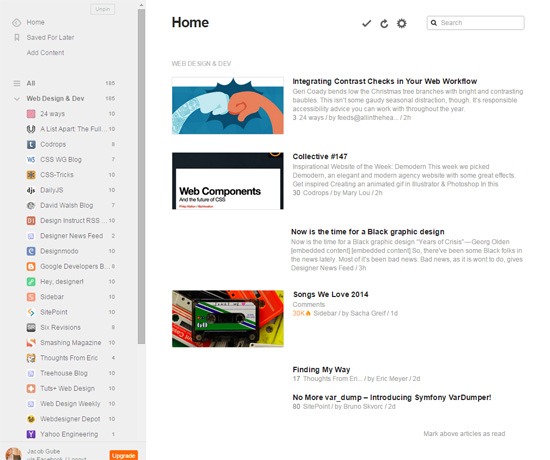
Web-based means that the feed is presented through some web site or that the reader is installed and run as a plug-in in a browser. One example of this technology is Feedly.

What is a stand-alone feed reader? Give an example of at least one current application.

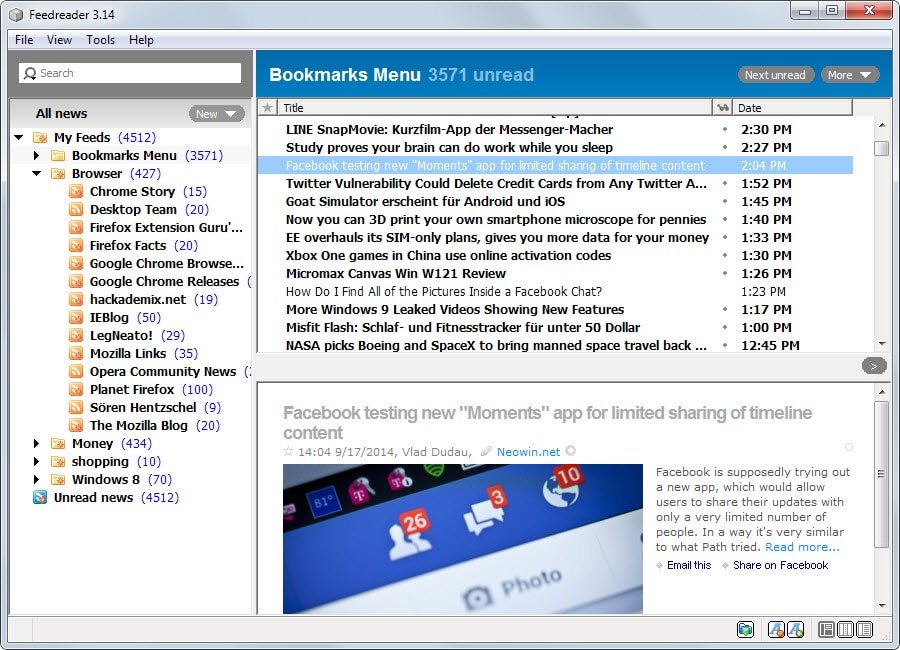
Stand-alone means that the feed reader is a program installed on your computer and it can be started and by itself; it doesn’t run as a component of some other more general program. One example of this technology is Feedreader (this brand also has a web-based feeder).

Identify the features of these feed readers.

Feedly is an online RSS reader with a clutter-free user interface. It has an “Add Content” feature which aids you in quickly finding new content sources to subscribe to. It runs directly on your browser, no plug-ins required. Though Feedly is free to use as-is, it does have a paid subscription plan that costs $5 a month. The paid plan unlocks some more features such as integration with web apps like Evernote and Dropbox.

This is how Feedly looks like:

Feedreader has been one of the first desktop feed readers dating back as early as 2001. The program allows you to import an OPML feed or add individual feeds to it instead. All feeds can be sorted into folders and tagged individually. Feedreader displays notifications automatically when new items are discovered.

This is how Feedreader looks like:

Feedreader – Desktop version

Web versions

I really appreciated the video explaining the different versions of Web. I did not even know that there were different versions of web prior to watching the video Web 1.0, 2.0, 3.0 and Beyond – Information and Interaction  

My understanding is that: 

Web 1.0 is a one-way website that provides static information to the public. 

Web 2.0 is a two-way website that provides information to the public and encourages interaction. Examples of this technology would be social networking sites and social medias sites like Facebook, YouTube and blog sites. 

Web 3.0 is a tree-way website that in addition to having the functionalities of Web 2.0, it also has a third component which is the server itself participating in the exchange. An example of this technology would be amazon.com because it suggests new products based on data analysis from historical purchases. 

Businesses today have many choices when it comes to social media channels. Some channels are better for certain business than others. Most businesses would benefit from a Facebook presence.  Businesses that have a teaching aspect would benefit from a YouTube channel. Job placement businesses benefit from having a LinkedIn account.

Creative Commons — CC

Questions: 

a. What are Creative Commons licenses? 

A Creative Commons (CC) license is one of several public copyright licenses that enable the free distribution of an otherwise copyrighted “work”. A CC license is used when an author wants to give other people the right to share, use, and build upon a work that he or she (that author) has created. 

b. How do Creative Commons licenses work? 

When someone makes a “work” available through Creative Commons, every license says: 

– that you need to give credit to the person that originally created the work 

– whether or not it is available for commercial use 

– whether or not derivative works or adaptations are allowed 

– whether or not one needs to share alike (do I need to offer it to the next person under the same terms? ) 

c. Explain how a CC license would be useful for someone with an original video on YouTube.  

YouTube utilizes CC licenses in their content. When posting an original video to YouTube,  the content creator grants others the CC rights as described above. 

Other YouTube users can then find this video and reuse it in making their videos. When they use the CC By license, the system will generate a signature to the video automatically. This will show the source video’s titles below the video player. 

The creator retains the copyright of the video while others can reuse the video but under the terms of the license. 

Class video https://creativecommons.org/ and Creative Commons: Remix